GPUs abstract away everything that happens between a vertex and a pixel. I wanted to see what that actually looks like in code. No OpenGL, no Vulkan, just a framebuffer in memory and math. Here is a walkthrough of a minimal triangle rasterizer written in C that outputs a PNG. Full source on GitHub.
The Framebuffer
A framebuffer is just a flat array of pixels. Each pixel is three bytes: red, green, blue. Width x height x 3 bytes total.
typedef struct {
    int width;
    int height;
    unsigned char* colorBuffer;
} Framebuffer;

void initFramebuffer(Framebuffer* fb, int width, int height) {
    fb->width = width;
    fb->height = height;
    fb->colorBuffer = malloc(width * height * 3);
}
Clearing it is just writing the same RGB value to every pixel:
void clearFramebuffer(Framebuffer* fb, unsigned char r, unsigned char g, unsigned char b) {
    for (int i = 0; i < fb->width * fb->height; i++) {
        fb->colorBuffer[i*3 + 0] = r;
        fb->colorBuffer[i*3 + 1] = g;
        fb->colorBuffer[i*3 + 2] = b;
    }
}
To write the result to disk, stb_image_write handles the PNG encoding with one call:
stbi_write_png(filename, fb->width, fb->height, 3, fb->colorBuffer, fb->width * 3);The Edge Function
The core of rasterization is deciding whether a pixel falls inside a triangle. The edge function does this using the 2D cross product.
Given three points A, B, C, the edge function computes the Z component of BA × CA. Since these are 2D points, the cross product only has a Z component. That Z value equals the signed area of the parallelogram formed by those two vectors. Half of it is the area of triangle ABC.
float edgeFunction(Vec2 a, Vec2 b, Vec2 c) {
    return (c.x - a.x) * (b.y - a.y) - (c.y - a.y) * (b.x - a.x);
}
The same cross product also tells you which side of the line a point is on. Point your fingers from A to B, then curl them toward C. By the right-hand rule, if C is above the line AB, your thumb points out of the screen and the result is positive. If C is below the line, your thumb points into the screen and the result is negative. That sign is the coverage test: if a pixel P produces the same sign for all three edges of the triangle, it is inside.
Barycentric Coordinates
Once you know a pixel is inside the triangle, you need to know where inside, to interpolate vertex attributes like color, UVs, or normals.
Barycentric coordinates (w0, w1, w2) express any point P inside the triangle as a weighted sum of its vertices:
P = w0*V0 + w1*V1 + w2*V2 where w0 + w1 + w2 = 1The edge function gives you this for free. Calling edgeFunction(V1, V2, P) returns the area of the sub-triangle formed by V1, V2, and P. Dividing by the total triangle area gives you the barycentric weight for V0:
float area = edgeFunction(v0.position, v1.position, v2.position);

float w0 = edgeFunction(v1.position, v2.position, p) / area;
float w1 = edgeFunction(v2.position, v0.position, p) / area;
float w2 = edgeFunction(v0.position, v1.position, p) / area;
These weights then drive the color interpolation across the triangle surface.
Drawing the Triangle
Testing every pixel in the framebuffer against a triangle would be wasteful. Instead, compute the triangle's axis-aligned bounding box and only iterate over that region:
int x0 = (int)fmaxf(floorf(minX), 0);
int y0 = (int)fmaxf(floorf(minY), 0);
int x1 = (int)fminf(ceilf(maxX), fb->width - 1);
int y1 = (int)fminf(ceilf(maxY), fb->height - 1);
For each pixel in the bounding box, sample at its center (x + 0.5, y + 0.5) and run the edge tests. The sign check handles both winding orders. If all three weights are positive or all three are negative, the point is inside:
if ((w0 >= 0 && w1 >= 0 && w2 >= 0) ||
    (w0 <= 0 && w1 <= 0 && w2 <= 0)) {
Then normalize the weights and interpolate the vertex colors:
w0 /= area; w1 /= area; w2 /= area;

float r = w0*v0.color.r + w1*v1.color.r + w2*v2.color.r;
float g = w0*v0.color.g + w1*v1.color.g + w2*v2.color.g;
float b = w0*v0.color.b + w1*v1.color.b + w2*v2.color.b;
Write to the buffer:
int index = (y * fb->width + x) * 3;
fb->colorBuffer[index + 0] = (unsigned char)(r * 255);
fb->colorBuffer[index + 1] = (unsigned char)(g * 255);
fb->colorBuffer[index + 2] = (unsigned char)(b * 255);
Putting It Together
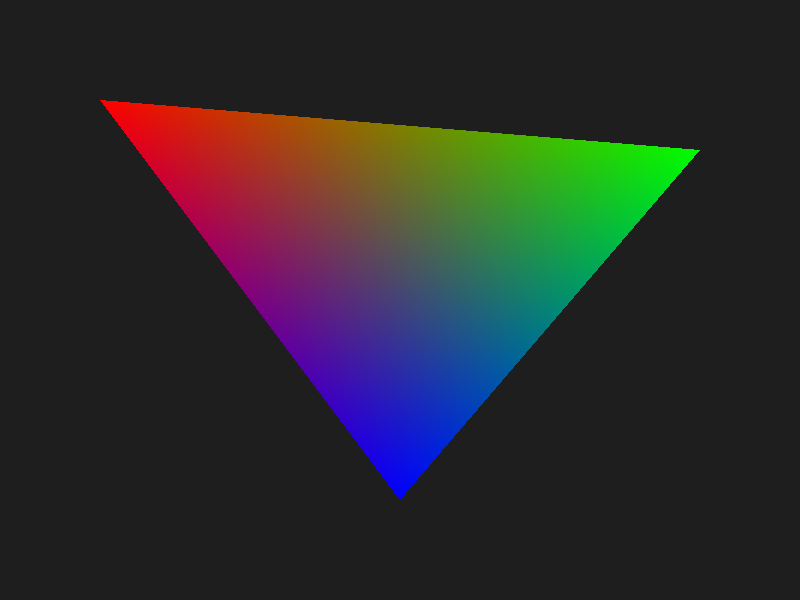
In main, set up three vertices with positions and colors, draw the triangle, and save the PNG:
Framebuffer fb;
initFramebuffer(&fb, 800, 600);
clearFramebuffer(&fb, 30, 30, 30);

Vertex v0 = { {100, 100}, {1, 0, 0} };
Vertex v1 = { {700, 150}, {0, 1, 0} };
Vertex v2 = { {400, 500}, {0, 0, 1} };

drawTriangle(&fb, v0, v1, v2);
savePNG(&fb, "output.png");
free(fb.colorBuffer);
The result is an 800x600 image with a smoothly color-interpolated triangle: red at the top-left vertex, green at the top-right, and blue at the bottom.
What This Skips
This is the minimum viable rasterizer. A production path would also include:
- Depth buffer: a z-value per pixel to resolve triangle ordering
- Perspective-correct interpolation: barycentric weights need to be divided by W before interpolating attributes; skipping this causes texture warping
- Clipping: triangles that straddle the near plane or screen edge need to be clipped before rasterization
- Sub-pixel precision: using fixed-point edge functions to avoid cracks between adjacent triangles
- Tile-based rendering: splitting the screen into tiles to improve cache coherence and enable parallelism
But the heart of it is exactly what this is: edge functions, barycentric weights, bounding box traversal. Everything else is built on top of this loop.